
Prompting Claude Is Not a Finance Workflow
Claude reasons through complex problems. It builds presentations and Excel workbooks. But it also makes mistakes. Sometimes it even defends them.
When complex work requires precise, predictable outputs, prompting is not enough.


A prompt on its own is not finance infrastructure.
Prompting Claude works when the question is contained. It becomes fragile when one chat is asked to read messy files, normalize the data, check assumptions, calculate drivers, and produce a logically sound answer.
Even with checks and Excel sheets produced with working formulas, the prompt on its own can produce distinct answers each time you run it. Ask Claude or ChatGPT a complex question twice and you may get a different answer. That is dangerous when the work has to be reviewed, repeated, and defended.
Finance professionals need workflows that can be repeated, inspected, and defended.
AI makes every finance tool more accessible and more powerful. This is most true for Python.
The old tradeoff was convenience versus potential. AI narrows that gap.
Tool map before AI
tool map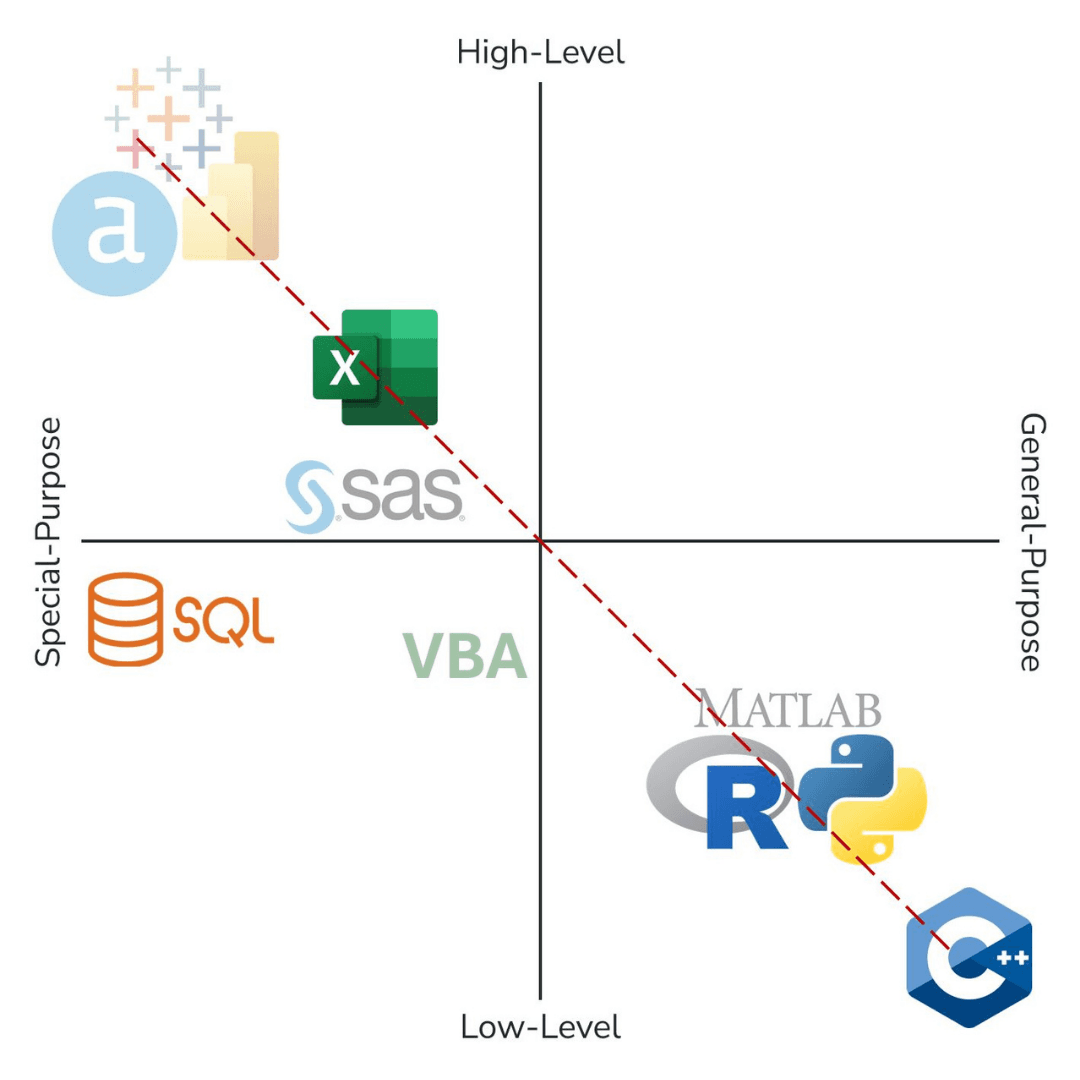
AI helps inside Excel. It changes the game in Python.
In Excel, AI can help you decide how to structure a model, explain why a SUMIFS or XLOOKUP approach is cleaner than a brittle VLOOKUP, generate a formula, or draft VBA that automates part of a workbook. That is useful. The formula becomes permanent infrastructure inside the model.
But Python extends that idea outside the workbook. The same AI assistance can generate code that reads the files, validates the inputs, applies the logic, calls an AI model only where judgment is useful, and exports the result. You then refine, approve, and place that code into the workflow.
That is the practical shift: AI-generated code becomes workflow infrastructure you can inspect and control.
AI generates workbook logic.
Ask AI how to summarize monthly revenue by segment, region, and scenario. It may recommend SUMIFS or XLOOKUP, then produce the exact formula. Once reviewed, that formula lives inside the model.
=SUMIFS(
  Revenue,
  Segment, F$4,
  Region, $B12,
  Scenario, $C$2
)
AI reduces Python's convenience disadvantage while enhancing its primary advantage: potential.
Python becomes more accessible, which matters because you can do more in Python than you can in Excel, including more with AI.
You are able to generate code, or permanent infrastructure, and then inspect it with relatively modest knowledge of the tool. That lets you refine a final product that becomes part of your workflow.
And what that means is that you can now access all the benefits Python provides, including superior control over AI.
AI generates workflow code.
Ask AI for the same logic in Python and it can draft a process that reads many files, groups the data, validates the totals, and exports a clean report. Once reviewed, that code can run again next month.
files = load_folder("monthly_revenue/")
clean = validate_schema(files)
summary = group_by(clean, ["segment", "region", "scenario"])
export_report(summary, "monthly_revenue_summary.xlsx")
More data
Python handles larger, messier multi-source data workloads than spreadsheets.
More logic
Complex validation and branching logic are cleaner and safer in code.
More speed
Repeat monthly workflows without manual reset and copy-paste churn.
More systems
Connect APIs, databases, folders, dashboards, and AI models in one chain.
Tool map with AI
tool map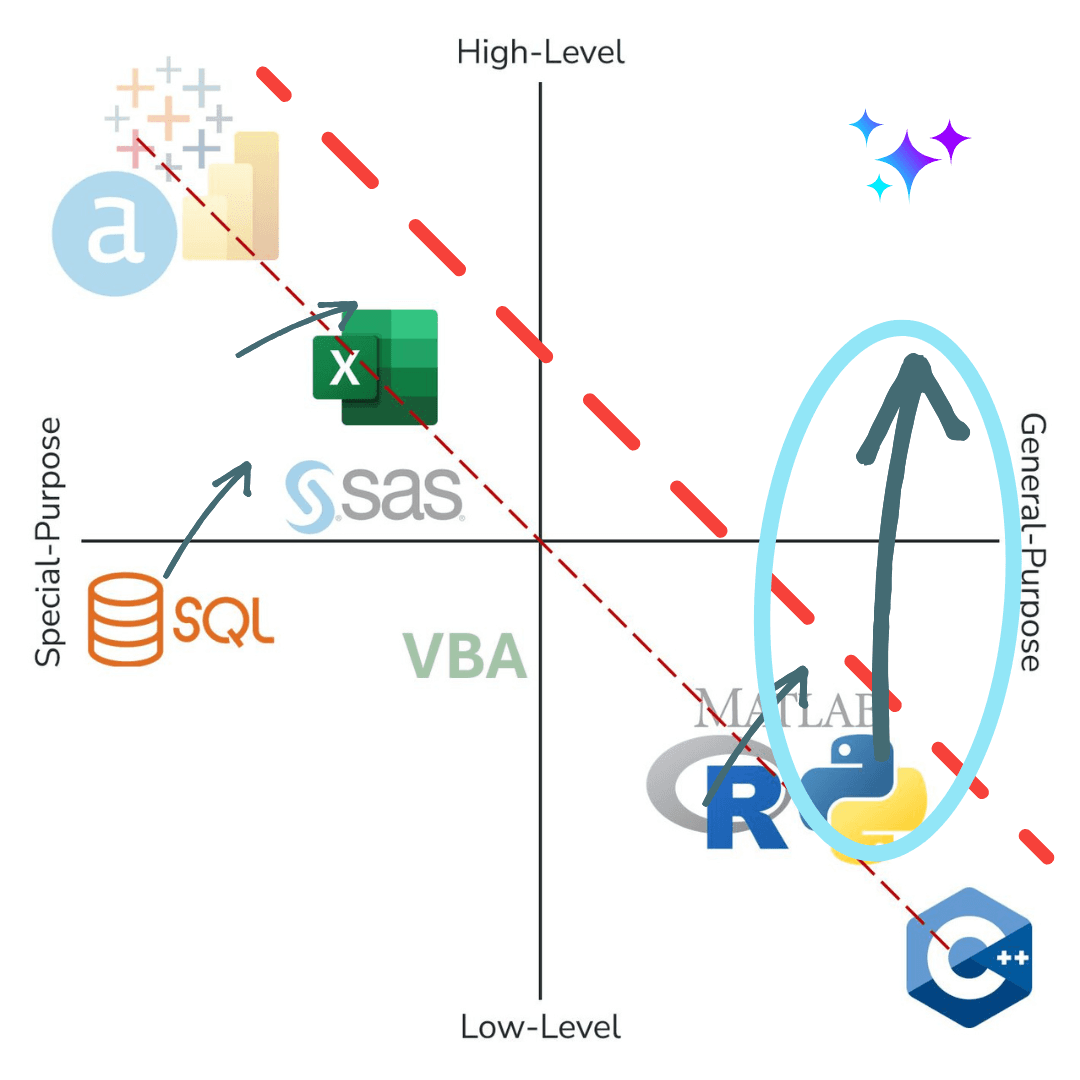
The API is how you keep the model on a short leash.
An API lets Python decide what the model sees, when it is called, and what format it must return.
In chat, the model owns the handoff.
The process lives in a conversation instead of a repeatable workflow.
Through the API, Python owns the workflow.
Python determines data, timing, and output schema before accepting responses.
That changes the risk profile.
AI becomes one constrained step inside a larger auditable process.
source = load_files("close_packet/")
checked = validate_inputs(source)
variance = calculate_variance(checked)
response = call_model_api(build_prompt(variance))
save_audit_trail(source, checked, response)
export_packet(variance, response)
5 places Claude + prompting breaks in finance work.
This is not anti-AI. It is pro-structure for finance-grade reliability.
It does not control the full work sequence.
Workflows must explicitly define load, check, compute, and export order.
It does not enforce the rules by default.
Code can enforce schema, thresholds, and failure conditions.
It does not separate data checks from judgment.
Validation should happen before interpretation.
It does not repeat cleanly.
Finance needs rerunnable logic with stable assumptions.
It does not leave a complete audit trail.
You need source, checks, model IO, and outputs preserved.
Learn Python + AI for free.
No payment, no commitment — just the skills to build controlled AI workflows.
Start learning for freeFrom messy transactions to clean finance logic.
The demo starts with Jack and Jill's household spending data because the problem is instantly recognizable: Amazon batch orders, inconsistent merchant names, split transactions, partial refunds, subscriptions, grocery runs, and categories that never quite line up. Then we take the same logic into the corporate world: transaction matching, classification, reconciliation, budgeting, forecasting, and FP&A analysis.
Jack and Jill's personal finance data is the relatable version of the same problem finance teams face at scale: inconsistent labels, fragmented sources, partial matches, exceptions, and transactions that refuse to categorize themselves cleanly.
The problem is messy by nature.
Amazon orders, refunds, subscriptions, merchant labels, bank exports, and split transactions do not arrive in clean FP&A-ready categories.
Python creates the structure.
The workflow reads the files, normalizes the fields, groups similar transactions, applies matching logic, and prepares the data before the model is asked to interpret anything.
OpenAI handles judgment where rules break down.
The model helps classify ambiguous descriptions, infer categories, and explain exceptions, but only inside the boundaries Python defines.
The same logic scales up.
What starts as household spending maps directly to corporate FP&A: multi-file reconciliations, transaction-level analysis, budget variance reviews, forecasting inputs, and large messy datasets.
This is what repeatable AI work looks like.
Python controls sequence, limits model visibility, restricts return format, and saves evidence.
csv_exports = load_csv_exports("jack_jill/")
merged = combine_sources(csv_exports)
matched = match_transactions(merged)
labels = label_with_openai(matched)
answer = FinanceChat(matched, labels).ask("where did spending change?")
export_excel_ready(matched, labels, answer)
Go further with structured courses built for finance professionals.
From Python fundamentals to machine learning and AI workflows — everything taught in real finance context.